

Namna Support
Support for the current iPhone build, including exports, privacy, What If changes, and local-only storage.
Have a question, found a bug, or want to suggest a feature? I'd love to hear from you.
Common Questions
Where is my data stored?
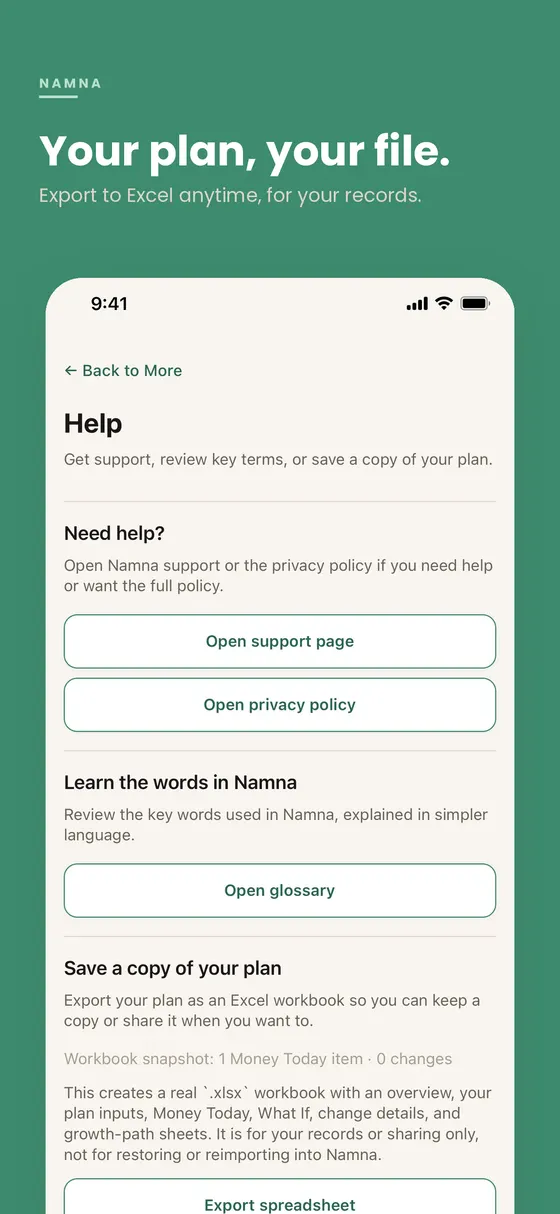
Your plan stays on your iPhone using on-device storage. Nothing is sent to a server. If you want a copy for your own records, you can export an Excel workbook from Help in the More tab.
How much does Namna cost?
Namna is available on the App Store at ₱99 one-time on iPhone, with no subscription.
You can view the listing here: Namna on the App Store.
Does Namna connect to my bank, broker, or government agencies?
No. Namna does not connect to banks, brokers, Pag-IBIG, SSS, GSIS, or any external system. All values are entered manually and stay on your device.
How do I move my plan to another device?
There is not currently a user-facing full restore flow for moving your plan from one device to another.
Right now:
- The Excel workbook export is for your own records, review, or sharing
- It is not meant to be reimported into the app
- If a future release adds a supported migration flow, this page will be updated
Why is my estimate still far away?
The estimate depends on your current savings, monthly savings, retirement target, and the long-term assumptions behind the money you added. Small changes to your savings rate, target spending, or money mix can move the estimate meaningfully. What If changes can also make the result later or earlier depending on the costs and money changes you add.
How do What If changes work?
What If changes let you test a different version of your future without changing your main plan.
Right now they can include:
- Money changes for specific items you already have
- Temporary costs such as tuition, repairs, caregiving, or a career break
These changes only affect that saved What If version. Your main plan stays the same unless you edit the main plan separately.
Does Namna include inflation?
Not yet. Current projections are shown in today's pesos, so future purchasing power may differ. This is called out in the app's planning note on the reveal screen.
Does Namna give financial advice?
No. Namna is a planning tool that shows estimates under the assumptions you set. It is not a substitute for consulting a licensed financial professional, and it does not recommend specific investments or products.
What happens to my data if I uninstall?
Everything is deleted. Because nothing is stored on a server, uninstalling removes all of your plan data permanently. Export an Excel workbook first if you want a copy for your own records.
What are snapshots and progress history?
Namna keeps automatic local snapshots of your current plan on that same phone. Those saved snapshots help show your progress history over time without asking you to save anything manually each time.
- Snapshots stay on your device
- They are not synced to a server
- They help you compare how your estimate changes over time
Is there an Android version?
Not yet. Namna currently ships for iPhone only.
How do refunds work?
Refunds for App Store purchases are handled directly by Apple. Visit reportaproblem.apple.com to request one.
Does Namna use a server or account?
No. Namna does not require an account, and it does not store your plan on a server. Your plan stays on your device unless you choose to export a workbook yourself.
Contact
Prefer a structured form? Fill this out and it will open your email client with everything pre-filled.
Prefer to write directly? Email jeryldevsocial@gmail.com
Disclaimer: Namna provides planning estimates only. It is not financial advice and is not a substitute for consulting a licensed financial professional.